

From Feature Branches to Agent Branches ft. Antigravity
When people talk about AI coding tools, the conversation usually revolves around models, prompts, context windows, and agent capabilities. That’s usually what grabs the headlines.
Yet the thing that caught my attention while using Antigravity wasn’t the AI at all. It was something completely unrelated to the recent AI boom and, in software development terms, almost dinosaur-age old.
Rediscovering Worktrees
Git worktrees aren’t new to me. In fact, I made a video about them back in 2021, calling them a better alternative to Git Stash. At the time, I viewed them as a handy Git feature for juggling multiple pieces of work without constantly stashing and unstashing changes. Useful, certainly, but not something I reached for every day.
That perspective started to change when I noticed Antigravity exposing worktrees directly in its interface. Instead of burying them behind terminal commands, it treated them as a first-class workflow. I decided to lean into that workflow while building a few small features, creating separate worktrees for each one.
What followed wasn’t a lesson in how Git worktrees work since I already knew that part. Instead, it was a realization that worktrees solve a much bigger problem than I had originally given them credit for. Antigravity made me see them not as a convenience feature, but as a compelling way to organize and isolate development work in an AI-assisted world.
So, those of you who aren’t familiar with Git worktrees, they allow you to have multiple working directories associated with a single Git repository. Each worktree can be on a different branch, and you can switch between them without affecting the others. This means you can have multiple branches checked out at the same time, each in its own directory.
Agent Branches in Action
Antigravity uses this feature to let you create “agent branches” for each task or feature you’re working on.
Instead of having a single “main” branch where all your work happens, you can have multiple branches that are isolated from each other.
This is especially useful when you’re working on multiple features or tasks simultaneously, as it prevents changes from one branch from affecting the others.
Here’s what it looks like in Antigravity.
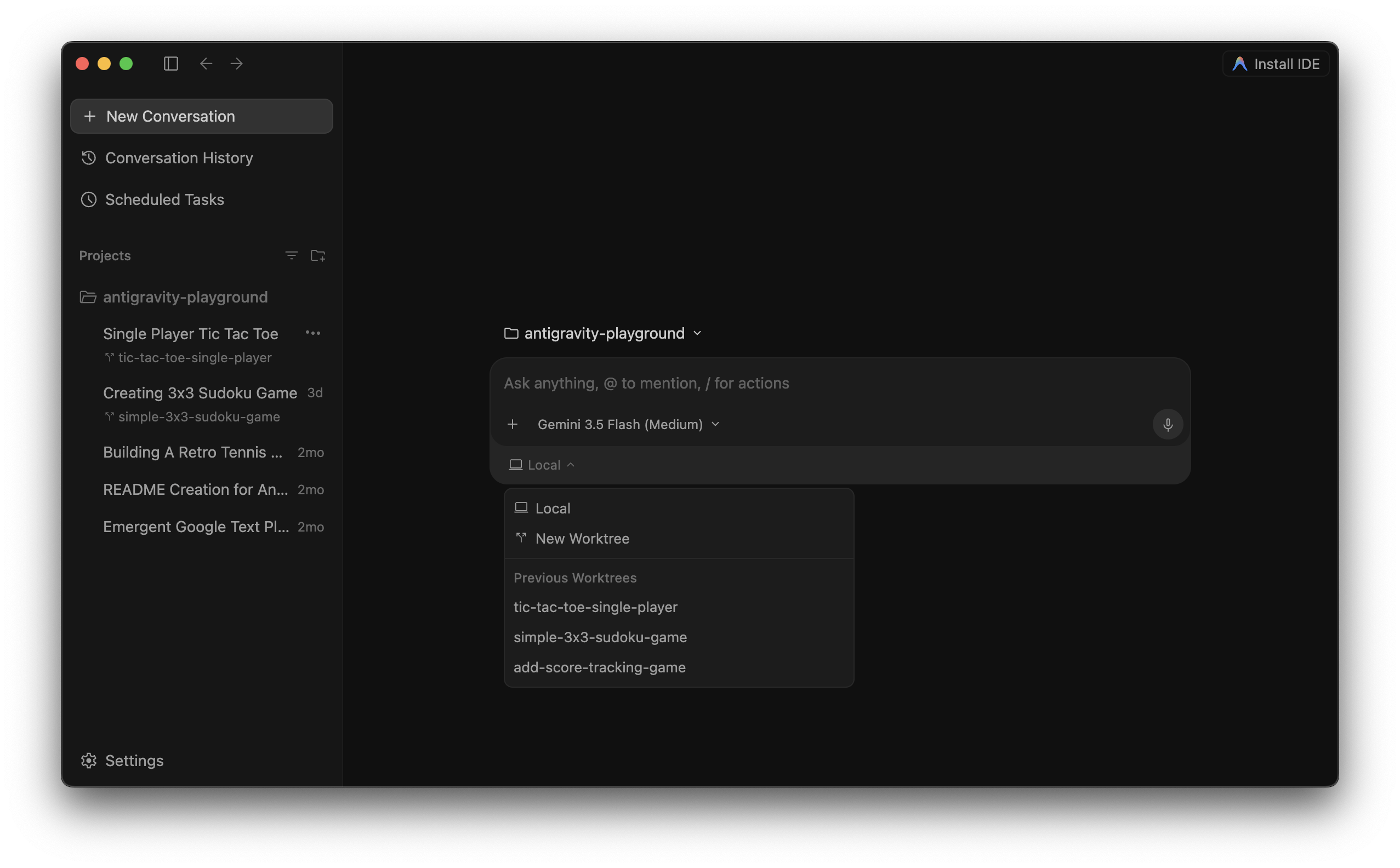
As you can tell, Antigravity makes it easy to create a new worktree or continue working from a previous one. Every feature gets its own workspace, making context switching feel much more natural.
The best part about it is that you can easily switch between these worktree branches without worrying about saving or stashing changes right from the Antigravity interface!
Under the Hood
Now, if you run git status in the terminal, here’s what it looks like.

As you can tell, when you run git status, it shows all the branches created under the worktree, and when you try to check out one of these branches, it won’t let you do that because the branch is already checked out in another worktree (which resides under a namespace under the .gemini folder, usually in your computer’s home directory).
Main Workspace
└── main

Worktree #1
└── add-score-tracking-game

Worktree #2
└── simple-3x3-sudoku-game
This means each task gets:
- a dedicated branch
- a dedicated checkout
- a dedicated filesystem
which is exactly what enables concurrent agent execution.
Quick tip: You can list all the worktrees in your repository by running
git worktree list. This will show you all the worktrees that are currently checked out, along with their paths and the branches they are on.
If, for some reason, you want to manually make changes in one of these branches, you need to switch to that worktree directory first and then make your changes. And once you’re done, you commit from these branches, or merge them back into the main branch just like you would with any other Git workflow.
In Closing
What I like most about this approach is that it makes context switching almost effortless. Instead of juggling branches, stashing changes, or maintaining multiple clones of the same repository, each feature lives in its own isolated workspace. The result is a workflow that feels cleaner, safer, and easier to reason about, especially when multiple streams of work are happening in parallel.
Git worktrees aren’t new, but Antigravity gave me a fresh perspective on them. Rather than treating them as an obscure Git feature reserved for edge cases, it elevates them into a core part of the development experience. And after spending some time with this workflow, I’m starting to think that worktrees may be one of Git’s most underrated features.

👋 Hi there! This is Amit, again. I write articles about all things web development. If you enjoy my work (the articles, the open-source projects, my general demeanour... anything really), consider leaving a tip & supporting the site. Your support is incredibly appreciated!



